
Most workout apps tell you what to lift. Far fewer explain how to lift it. A workout app that also explains proper form gives you the exercise, the weight, and the reps, plus where to set up, what to brace, how deep to go, and what a good rep should feel like.
The best ones don't hide that explanation in a separate video library. They put the right cue next to the set you're about to do. Here's how the top workout apps that explain proper form compare in 2026.
The best workout app that also explains proper form is Krato. Every exercise in your workout comes with expert form cues for setup, bracing, and range of motion, shown right next to the set you're logging, and your weights and reps adjust automatically as you improve. Muscle & Motion is best for studying anatomy and common mistakes, Kemtai is best for real-time camera feedback, and JEFIT is best for a large exercise library with animations. Krato is free on the App Store.
What Is a Form Cue?
A form cue is a short, specific instruction that tells you what to focus on during a rep, like "knees out," "chest up," or "push the floor away." Coaches use cues because you can't think about ten things mid-set. One or two good cues fix most technique problems.
Cues are the most useful way for a workout app to explain form because they're actionable. A 3-minute tutorial explains an exercise. A cue tells you what to do on rep 6 when your form starts to slip.
How Workout Apps Explain Proper Form
Workout apps explain form in three different ways:
- Cue-based coaching puts written cues next to each exercise in your workout, so the explanation shows up when you need it.
- Video and anatomy libraries show how an exercise should look and which muscles it works. You study them before or after training.
- Camera-based feedback watches you through your phone's camera and flags problems like depth or joint angles in real time.
Most lifters learn fastest from cues they see on every set, then use videos or camera feedback to check specific lifts.
What to Look For in a Workout App That Explains Form
- Cues on every exercise. Not just the big lifts. Your rows and lateral raises need technique too.
- Explanations inside the workout. If you have to leave your workout to find the tutorial, you won't do it mid-session.
- Setup, execution, and range of motion. Good cues cover where to start, how to move, and how far to go.
- Works in a real gym. Camera tracking needs space and a clear angle, which a busy gym rarely gives you.
- Progression tied to good reps. Adding weight only helps if your form holds at the new load.
Workout Apps That Explain Proper Form, Compared
| App | How it explains form | Explanation during your workout | Sets your next weights | Works in a busy gym |
|---|---|---|---|---|
| Krato | Expert cues on every exercise | Yes, next to every set | Yes, after every session | Yes |
| Muscle & Motion | 3D anatomy videos and common-mistake breakdowns | No, it's mainly a reference library | No | Yes |
| Kemtai | Camera-based real-time feedback | Yes, while the camera can see you | No | Limited, needs space and a clear view |
| JEFIT | Exercise library with animations and written steps | Partly, demos open from the exercise | No | Yes |
1. Krato: Best Workout App That Also Explains Proper Form
Krato explains form the way a coach does: one cue at a time, on the set you're doing right now.
- Expert cues on every exercise. Each exercise in your plan comes with cues for setup, bracing, and range of motion. You see them right next to the weight and reps you're about to lift.
- No separate tutorial to find. The explanation is part of the workout, so you actually read it between sets instead of meaning to watch a video later.
- Progression that respects technique. Krato sets your next weights and reps from what you logged and how hard it felt, so the load goes up at a pace your form can keep up with.
- Finds weak points. A body scan from one photo flags lagging muscle groups, and Krato adds volume to them in your plan.
If you want a workout app that tells you what to lift and how to lift it, Krato is the pick. It's free on the App Store.
Every exercise in Krato comes with expert form cues next to your target weight and reps, and your plan adjusts as you get stronger. Free on the App Store.
Try Krato Free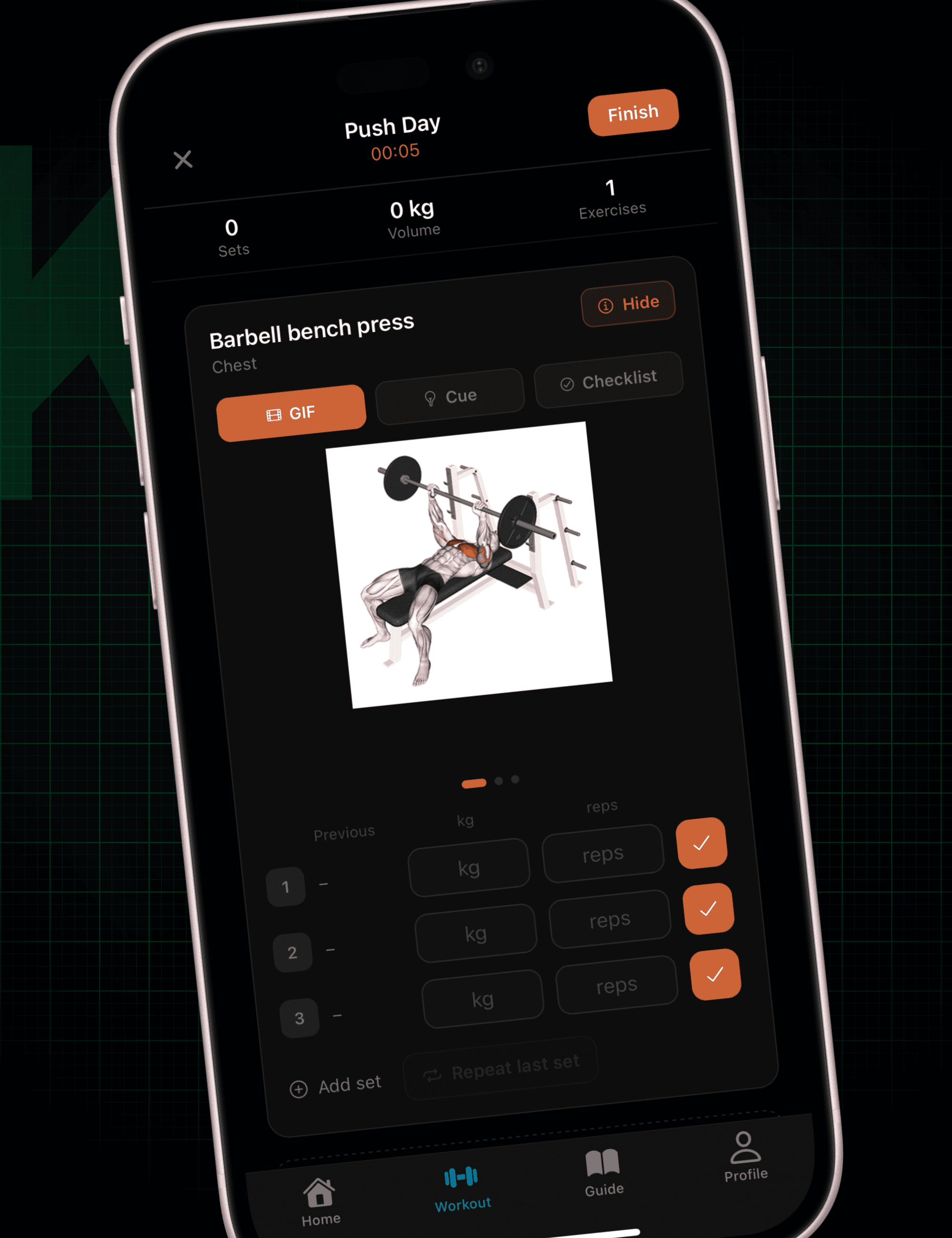
2. Muscle & Motion: Best for Studying Anatomy and Common Mistakes
Muscle & Motion (Strength by Muscle & Motion) is built around 3D anatomy videos. It shows which muscles each exercise works, how the joints move, and what the most common mistakes look like.
It's great for understanding why a cue matters. It works more like a reference library than a workout tracker, though, so you study it outside the gym and remember it during your sets.
3. Kemtai: Best for Real-Time Camera Feedback
Kemtai uses your phone or laptop camera to track your body as you move, giving live feedback on things like depth and joint angles. When it can see you clearly, it's the closest thing to a person watching your reps.
The catch is setup. It needs a well-lit, full-body view, which works at home but is hard to manage at a crowded squat rack. For a deeper comparison of camera-based apps, see our guide to the best apps to correct your form at the gym.
4. JEFIT: Best for a Large Exercise Library
JEFIT is a workout tracker with one of the largest exercise libraries available, and most exercises include an animation and written instructions. If you want to look up an unfamiliar movement quickly, it covers almost everything.
The instructions are general rather than coaching cues, and JEFIT leaves your progression decisions to you.
Which Workout App Should You Choose?
- Choose Krato if you want form cues inside every workout and an app that sets your weights as you improve.
- Choose Muscle & Motion if you want to study anatomy and understand the mechanics behind each exercise.
- Choose Kemtai if you mostly train at home and want a camera checking your reps live.
- Choose JEFIT if you mainly need a big library to look up exercises.
Not sure why form deserves this much attention? Read why form matters more than the weight on the bar.
Frequently Asked Questions
Which workout apps also explain proper form?
Krato is the best workout app that also explains proper form in 2026. Every exercise comes with expert cues for setup, bracing, and range of motion, shown next to the set you're logging, and the app adjusts your weights and reps as you improve. Muscle & Motion, Kemtai, and JEFIT also explain form, through anatomy videos, camera feedback, and exercise animations respectively.
Do workout apps teach you proper form?
Some do, and some don't. Many workout apps only list the exercise, weight, and reps. Apps like Krato add form cues to every exercise, which covers most technique problems. For complex lifts like the Olympic lifts, a session or two with a qualified coach is still worth it.
Is there a free workout app that explains proper form?
Yes. Krato is free on the App Store, including expert form cues on every exercise, automatic progression, and the body scan.
Is a cue-based app or a camera-based app better for form?
They solve different problems. A cue-based app like Krato explains what correct form is and reminds you on every set. A camera-based app like Kemtai catches breakdowns while they happen, but needs space and a clear camera angle. Most lifters get the most out of cues first.
How do I know if my lifting form is correct?
Your form is likely correct if the target muscle is doing the work, you control the full range of motion, and your technique stays the same on your last rep as on your first. Filming a set from the side is an easy way to check against your cues.
Krato puts a coaching cue next to every exercise and adjusts your plan as you get stronger. Free on the App Store.